CoreFuelGet the app

For iPhone · Fourteen days free

Point it at the plate. Every number says where it came from.

CoreFuel breaks a photo, or a sentence, into named items with calories and macros for each. Correct what it got wrong and it lands on your day. Then it plans the week around it: meals at your targets, workouts that progress, and an estimate of your body from three photos.

Download on theApp Store
Coming soon toGoogle Play

Fourteen free days on every new account. Nothing to enter.

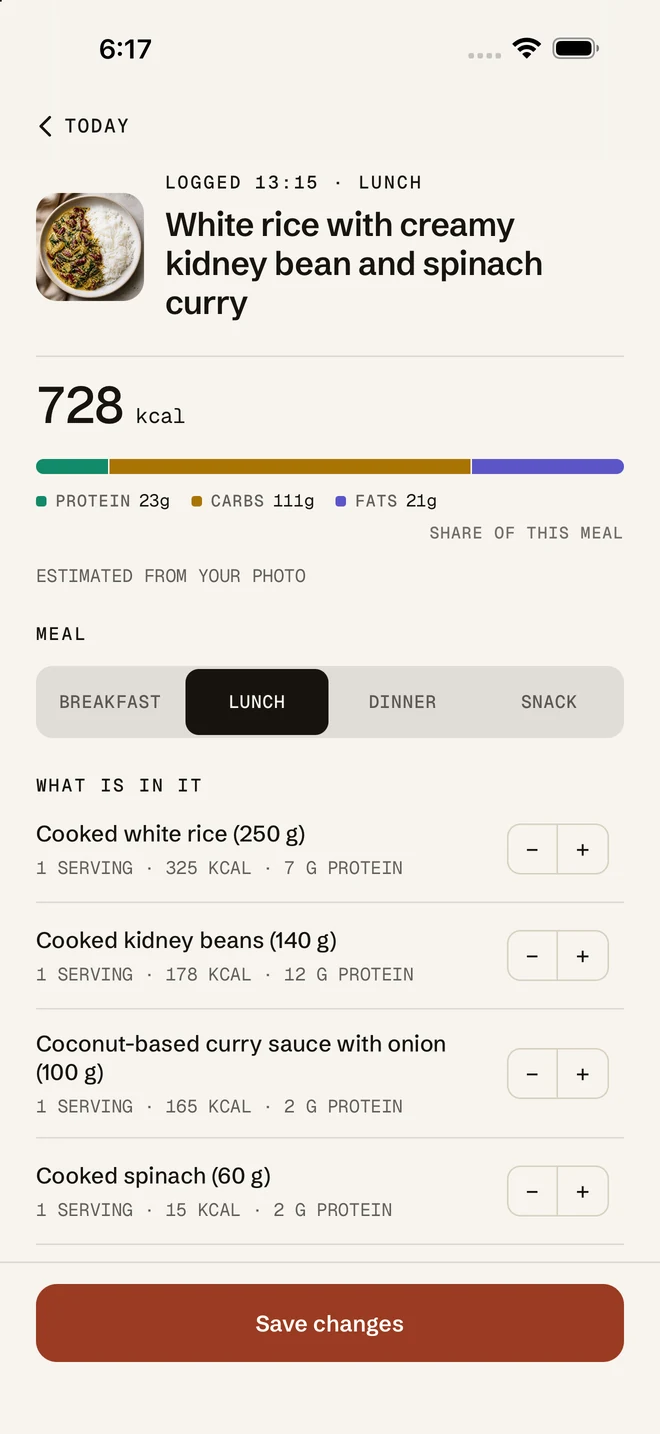
A photographed salmon Niçoise salad read into eight items in ten seconds, each with its portion and a stepper, and a button to log lunch at 954 kcal
That photo, added up
ItemCalories
Cooked salmon 180 g370
Baby potatoes 250 g193
Green beans 150 g47
Soft-boiled eggs 2 large144
Cherry tomatoes 120 g22
Red onion 60 g24
Black olives 30 g35
Olive oil dressing 1 tbsp119
Lunch954 kcal

Nobody lists the dressing. It was read from the dish and counted, and like every item it is yours to change or remove.

The log button

Photograph it. Say it. Scan it.

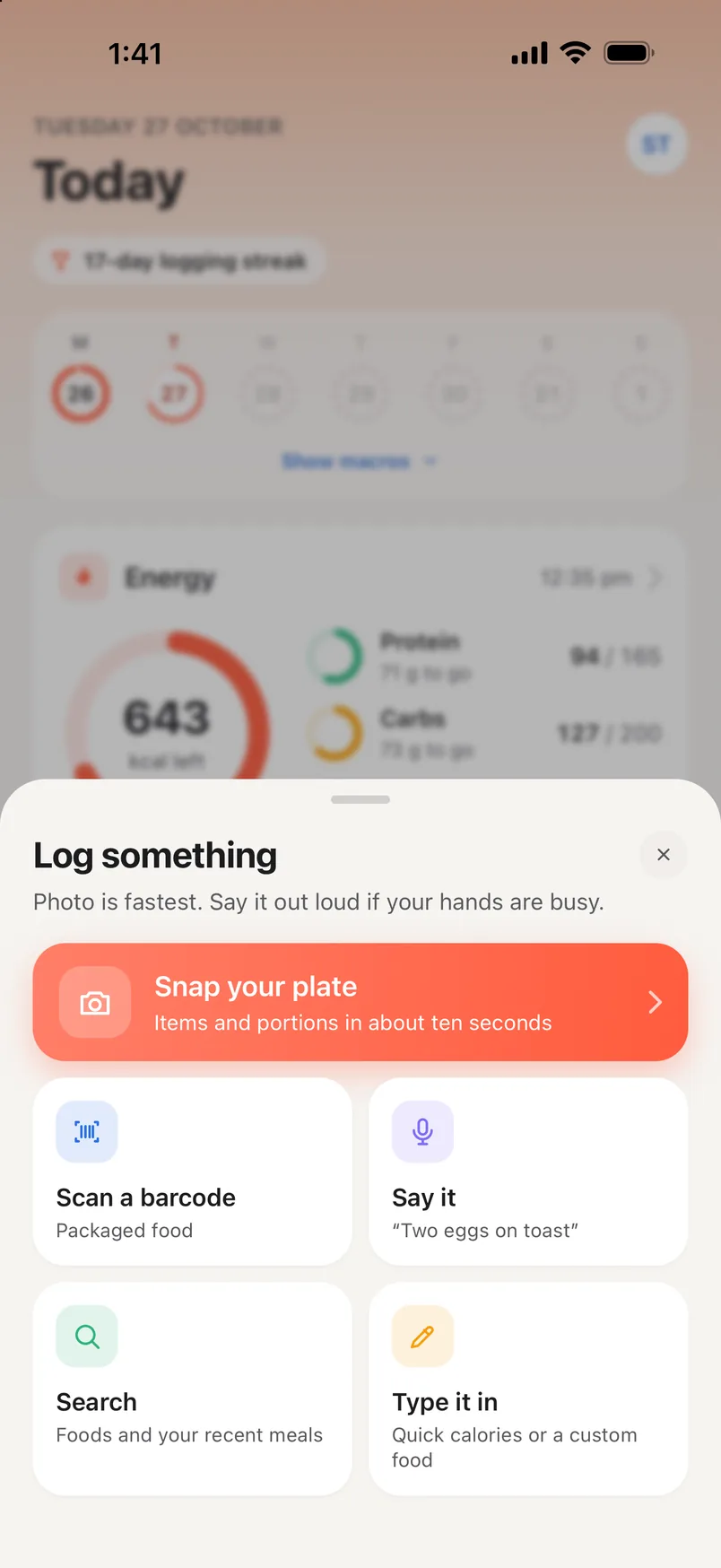
The fast ways in. Whichever you use, the estimate arrives as named items, each with its own calories and macros, and every one is yours to change before it counts.

One tap. The plate comes back itemised.

Whole plate in frame. Shoot from where you sit; we correct for angle, not for a missing edge. Items you did not photograph but must have eaten, like the oil the rice was cooked in, are listed at lower confidence so you can keep or remove them.

Anything that comes back above 1,000 kcal is refused and the plate is re-examined by a larger model. Totals are recomputed from the items, never taken on trust.

Packets and tins, matched to the label.

Barcodes are looked up in Open Food Facts, the crowd-sourced database, and credited as such in the app. If a code is not there, enter the figures from the label and it is yours from then on.

The Log something sheet over Today: Snap your plate, items and portions in about ten seconds; Scan a barcode; Say it; Search your foods and recent meals; and Type it in

Say it as a sentence, then tap the microphone to stop.

We read the whole sentence, not keywords. Before anything is worked out, your words go back on screen for you to check, because a misheard food is not a typo you notice later. It is the input to the calorie figure.

The recording is never kept. Not on the phone, not on the server.

Heard you
“I had two scrambled eggs on sourdough toast with a flat white and a handful of blueberries.”

That’s what we heard. Estimate from it, or tap the microphone to say it again.

2.3 s
From tapping stop to the sentence on screen, word for word.
5 items
441 kcal, with the butter nobody mentioned, at lower confidence.
  • Snap your plate
  • Scan a barcode
  • Say it
  • Search
  • Type it in
  • A meal from your plan, in one tap

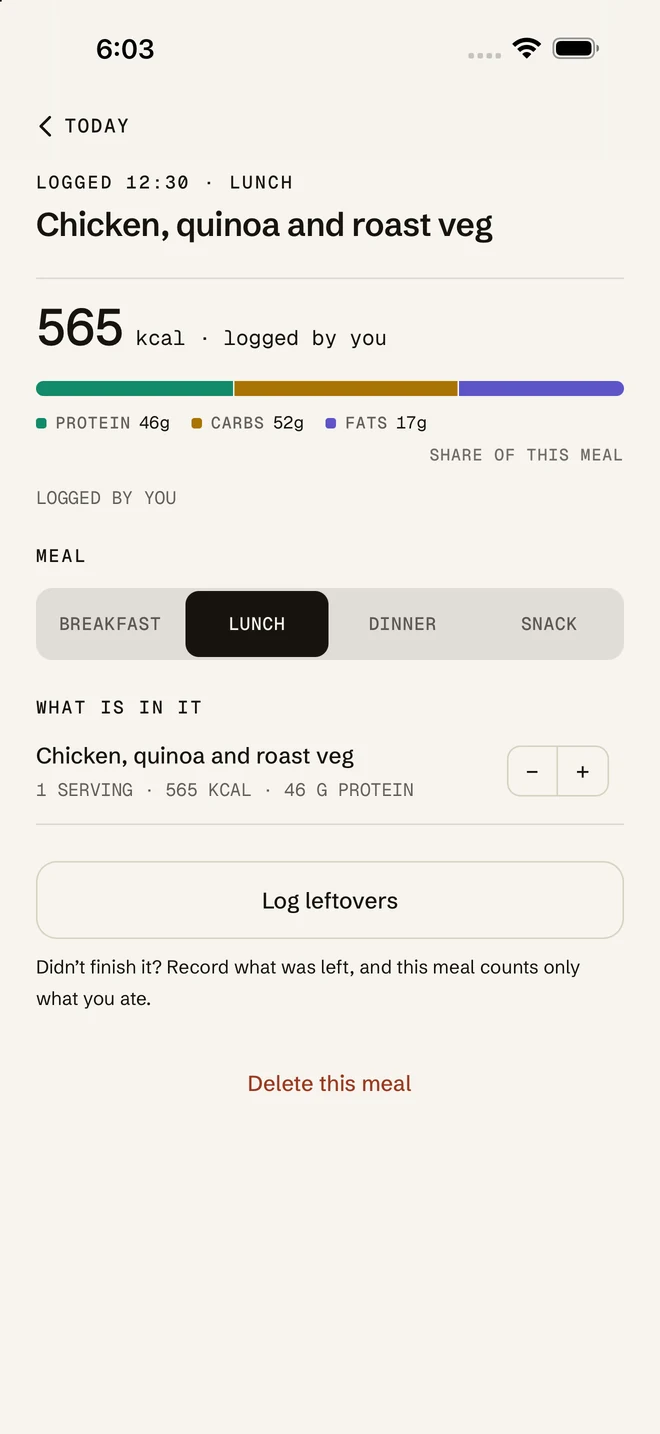
Today › a meal › Log leftovers

You didn’t finish it. It shouldn’t count as if you did.

Open the meal, tap Log leftovers, and tell CoreFuel what stayed on the plate. The meal recounts to what you ate, and so does the day.

A logged salmon Niçoise lunch at 12:35 pm: 954 kcal with 63 g protein, 67 g carbs and 50 g fat, 45% of the day's energy and 38% of its protein target, and every item with its own portion stepper

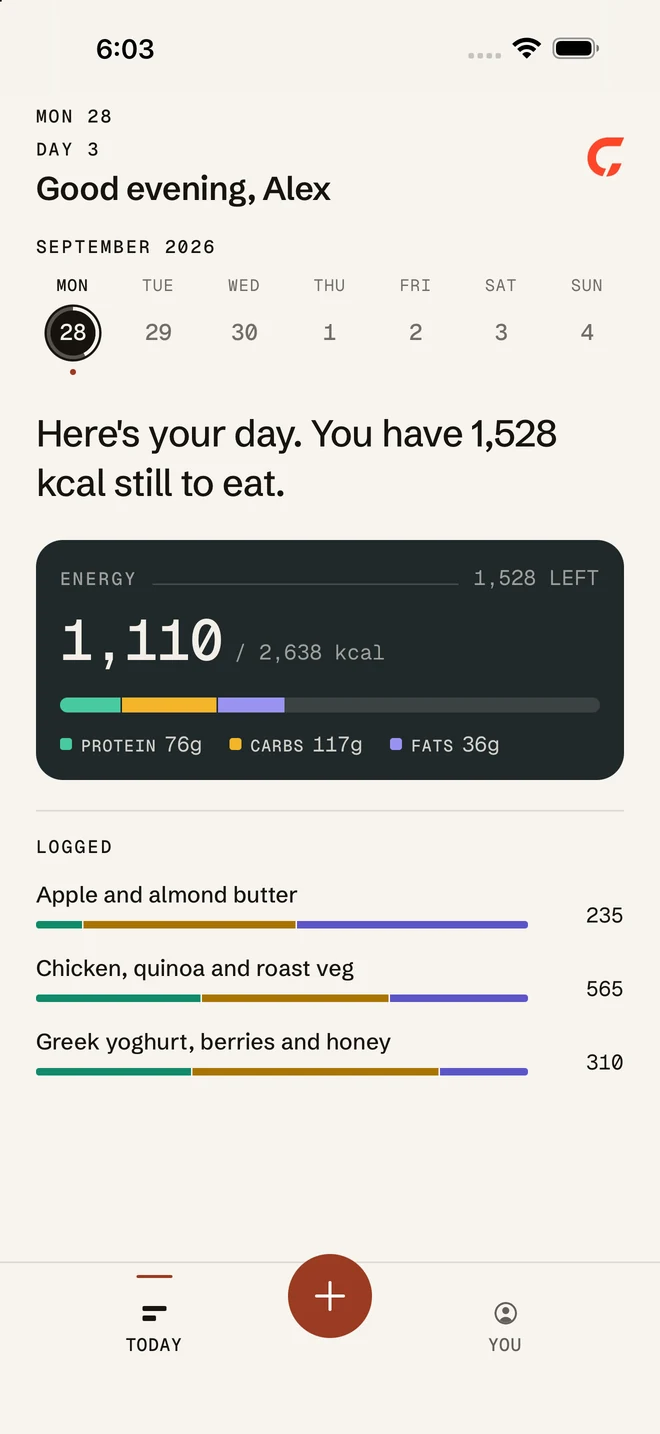
The day recounts itself

Tap how much of each meal you actually ate.

Energy1,528 LEFT

1,110/ 2,638 kcal

  • PROTEIN 76g
  • CARBS 117g
  • FATS 36g
Apple and almond butter235

AS SERVED · 235 KCAL

Chicken, quinoa and roast veg565

AS SERVED · 565 KCAL

Greek yoghurt, berries and honey310

AS SERVED · 310 KCAL

Photograph

The remaining plate

We compare it with the photo you logged when we can. When we can’t, we judge from the one photo, hold our confidence lower, and tell you so.

Say or type

A sentence

“Left half the rice and most of the slaw.”

By hand

Each item, in five steps

No AI at all.

You review every item before anything is saved, and the correction is reversible.

Plan › Meals

A week of meals at your targets.

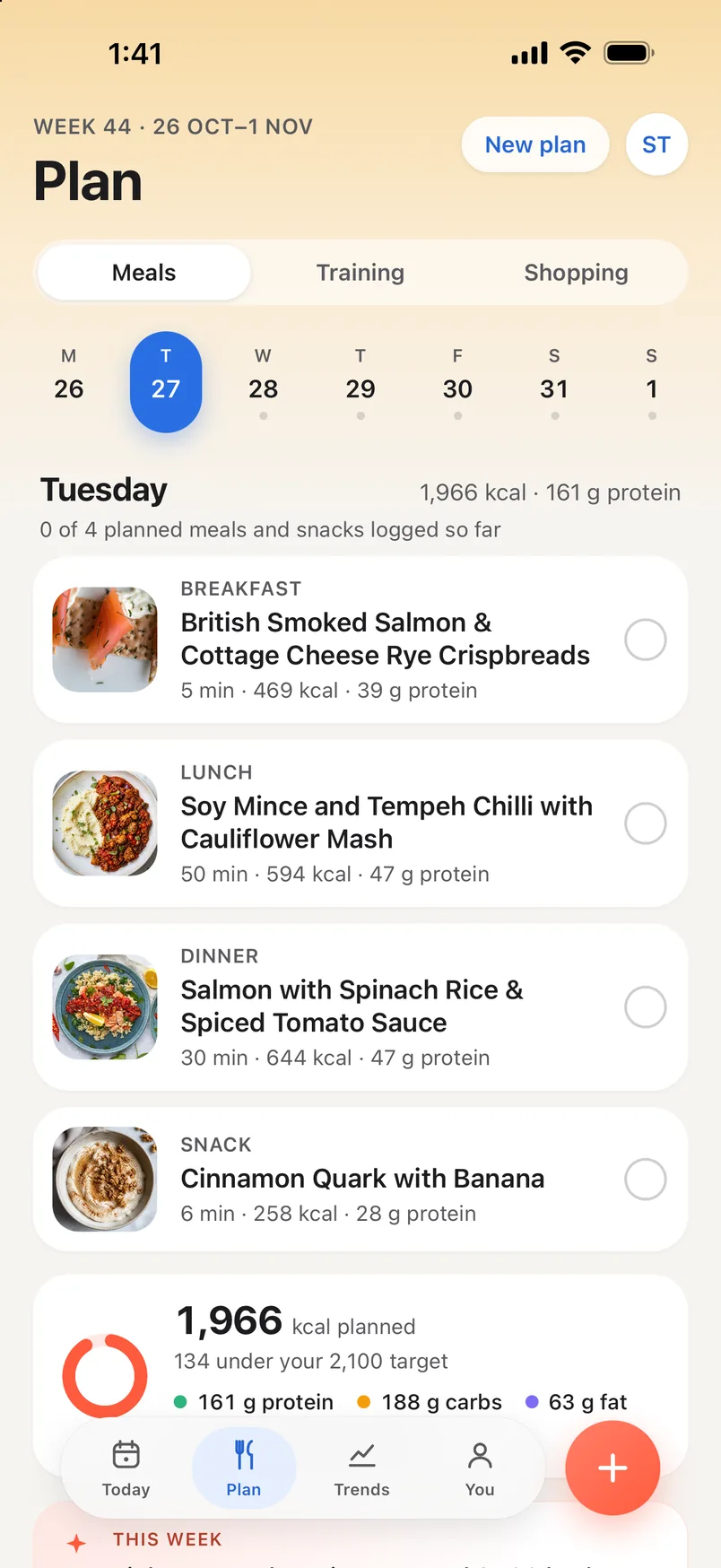
The Plan tab holds two weeks in one: what to eat, with its shopping list, and how to train. Both are written for you, and both log straight onto your day.

Plan, Meals, week 44: Tuesday's four planned dishes with photos — smoked salmon and cottage cheese rye crispbreads, 469 kcal; soy mince and tempeh chilli with cauliflower mash, 594 kcal; salmon with spinach rice, 644 kcal; cinnamon quark with banana, 258 kcal — 1,966 kcal and 161 g protein planned, 134 under a 2,100 target

The questions

Your diet, allergies and dislikes

Cuisines you enjoy, meals a day, how many people you cook for. Allergens are planned around, and every recipe still reminds you to check the labels.

The week

Picked at your calorie and protein targets

From over 5,000 recipes, by arithmetic rather than a guess, then refined by a model as a chef would. Each recipe shows its time, its calories and macros a serving, and how to make it.

Swap or log

A dish you don’t fancy, or one you ate

Let the plan pick another, or ask for something quicker or with more protein, and undo it if you change your mind. A planned meal goes on your day in one tap.

Shopping

The list, added up from the week

Grouped by aisle, ticked off as you shop, shared as text, and still there with no signal.

Sunday

Next week, written for you

If you ate from this week’s plan, next week’s is written on Sunday evening. If you didn’t, it asks first.

Plan › Training

Workouts that go up when you do.

A week written around your goal and your equipment, and a session that logs every set and says why today’s weight is today’s weight.

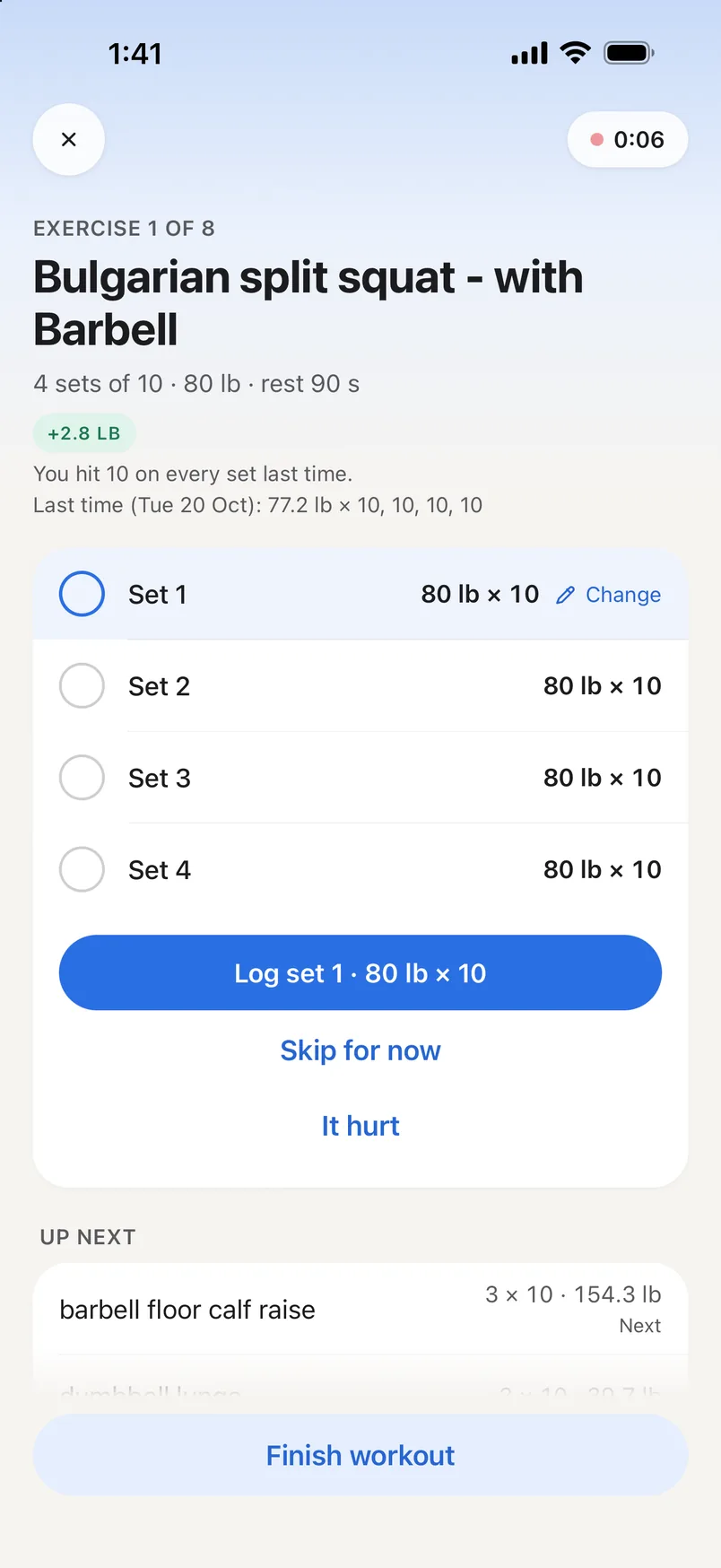
+2.8 lb
You hit 10 on every set last time.

Last time (Tue 20 Oct): 77.2 lb × 10, 10, 10, 10

Setup

Your equipment and your time

Full gym, free weights or bodyweight; thirty, forty-five or sixty minutes. A week is written around your goal, or one session for today is built instantly.

The session

Every set logged as you go

The load and reps for each set, a rest countdown between them, and what is up next. Where the catalogue has one, an animated demo or a video shows how it’s done. Sets logged without a signal save when you’re back.

Progression

Up when you earned it

Hit the top of your reps on every set and the lift goes up next time; miss and it holds. The session says which, and shows what you did last time.

It hurt

Back lighter, not skipped

Flag a lift and it starts about ten percent lighter next time. On a morning your readiness is low, CoreFuel offers a lighter day or one set fewer on each lift. Your call either way.

A workout in progress, exercise 1 of 8: Bulgarian split squat with barbell, 4 sets of 10 at 80 lb with 90 seconds' rest, up 2.8 lb because every set hit 10 last time — last Tuesday 77.2 lb for 10, 10, 10, 10 — with Log set 1, Skip for now and It hurt

Trends › Body, or the weekly check-in

Three photos. An estimate, with its error bar.

CoreFuel reads a front, side and back photo for an estimate of your body fat and where it sits, then suggests how much to cut and the targets to do it. Every result says how far off it could be.

How wide the estimate is, in points of body fat, around an example of 24%
With a scan report±1
Three photos±2.5
A pose skipped±4

Three photos

Front, side and back

In fitted clothes, the phone propped about two metres away, on a self-timer. Take them from the Body card on Trends or with your weekly check-in.

The estimate

Body fat, with its error bar

About two to three points either way from three photos, wider if you skip one, narrower when you add a photo of an InBody or DEXA printout. Lean mass follows from it, then where fat and muscle sit, a muscle map and posture.

The cut

How much, how fast, and the targets to do it

A target, a pace of 0.5–0.75% of body weight a week, and the daily calories and protein, worked out from the estimate, not written by a model. Apply them to your targets in one tap, or undo. A goal to gain or to hold gets its own version.

At the foot of every resultAn estimate from photographs, not a diagnosis. Scales, scans and a clinician measure more precisely.

Today and Trends

Your day on one screen. Your weeks in Trends.

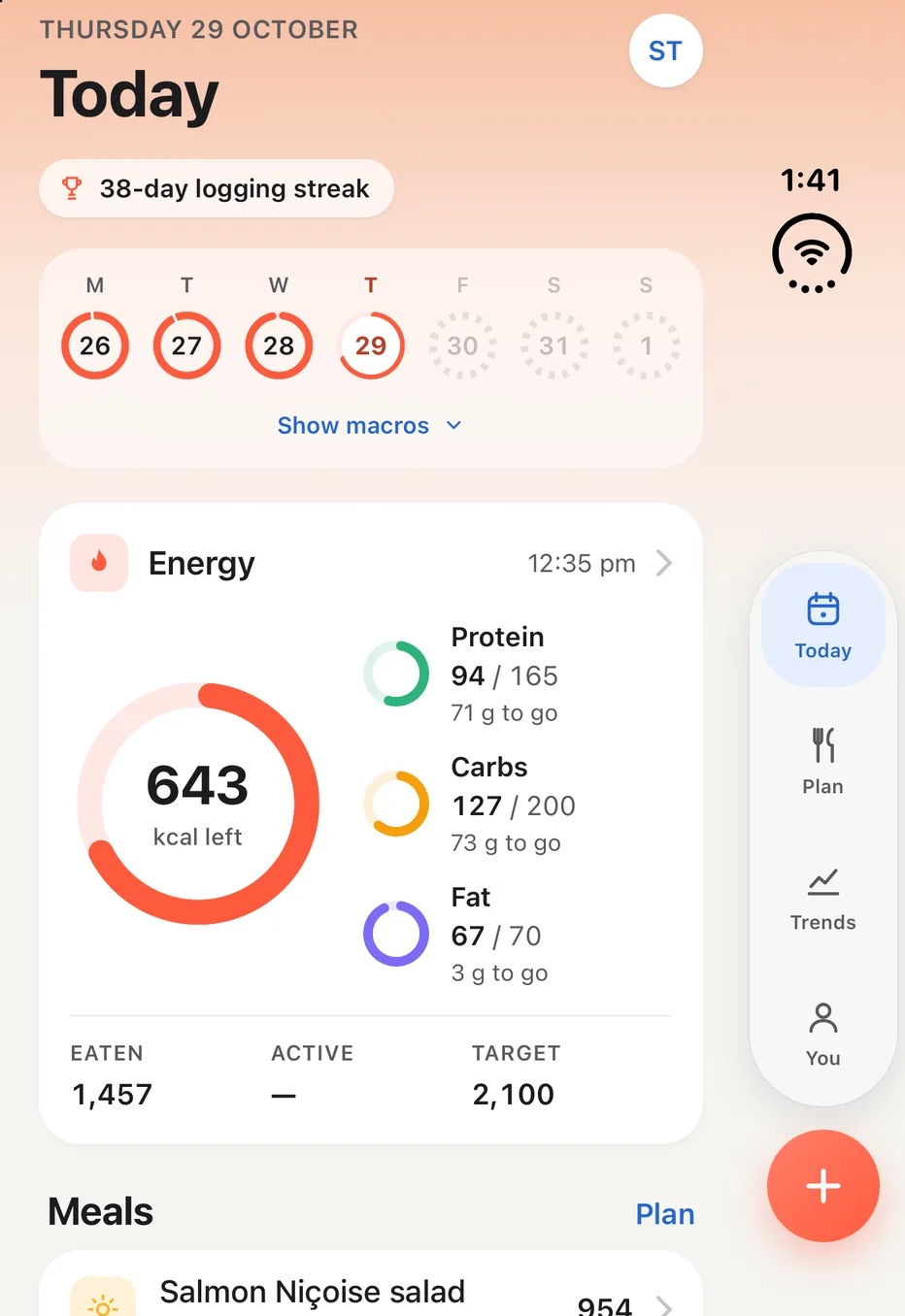
Today counts what is left to eat, rings each macro against its target, lists what you logged and shows the day’s session. Trends puts the days together, and each week ends with a review that says what comes next.

The Today screen: a 17-day logging streak, 643 kcal left of a 2,100 target, protein 94 of 165 g, carbs 127 of 200 g, fat 67 of 70 g, and today's Lower Body session, 48 minutes, ready to start
Today
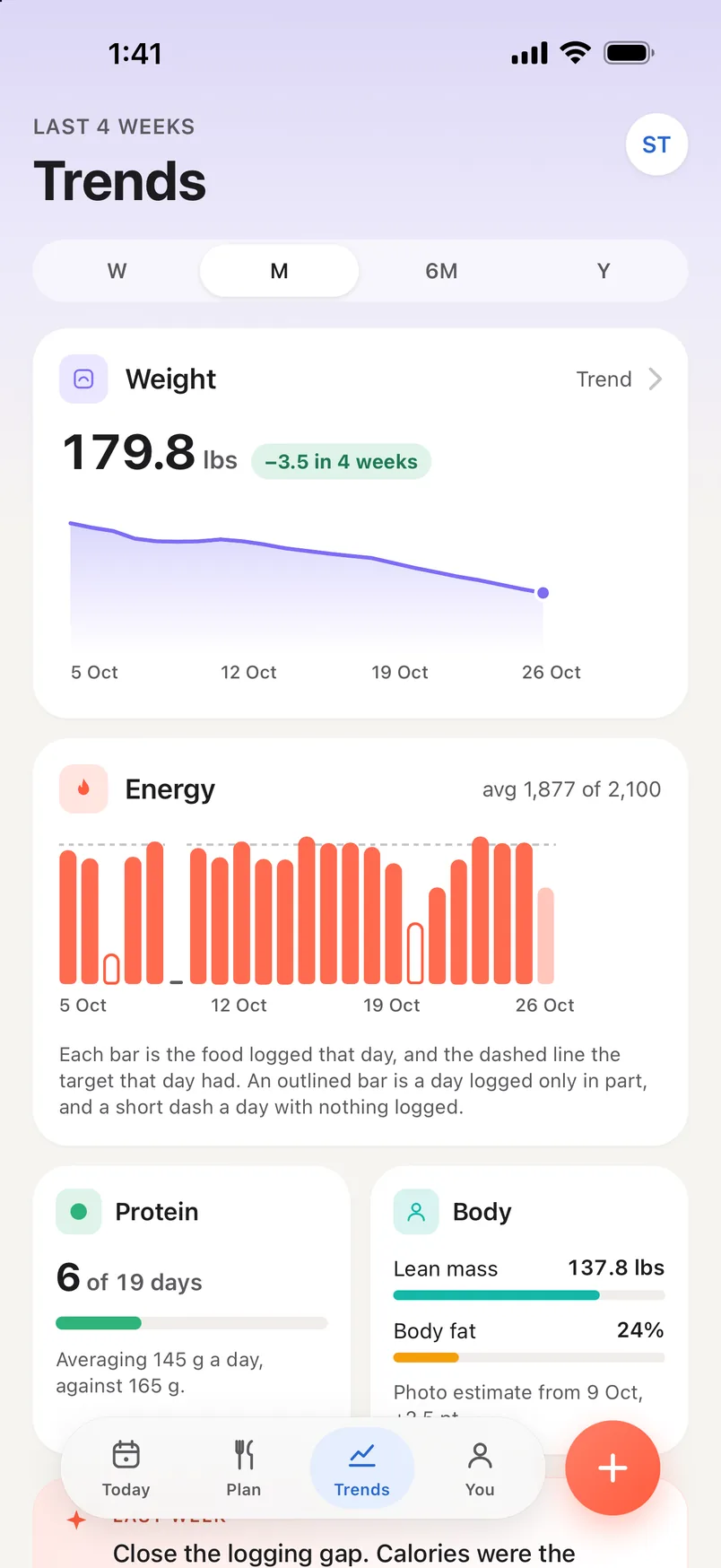
Trends over the last four weeks: weight 179.8 lb, down 3.5 lb, with its trend line; energy averaging 1,877 kcal against a 2,100 target; protein on target 6 of 19 days; and the Body card, a photo estimate of 24% body fat
Trends
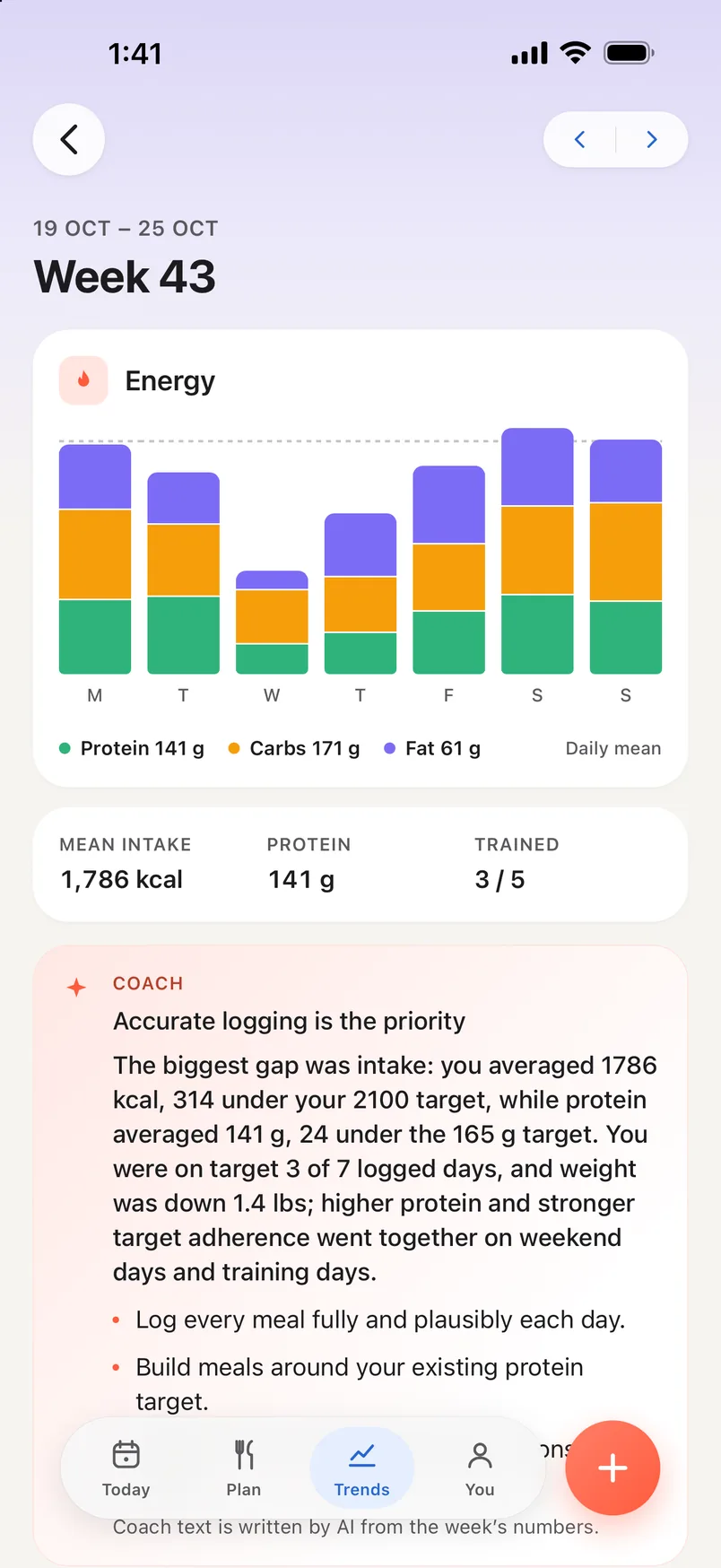
Week 43, 19 to 25 October, in review: energy by macro for each day, a mean intake of 1,786 kcal, 141 g of protein, 3 of 5 sessions trained, and the coach's read, Accurate logging is the priority, marked as written by AI from the week's numbers
A week in review

Every finished week gets a review, and a short read of it in its own numbers.

The bars, the averages and next week’s target are arithmetic. The coach’s paragraph is written by a model from those figures, and the screen says so: “Coach text is written by AI from the week’s numbers.”

Readiness

Sleep, heart-rate variability and resting heart rate against your own baseline. Each says where it was read from and which way it moved, and the full Readiness screen sits one tap behind it. On a low morning it can offer a lighter training session.

Trends

Weight with its trend line, energy against each day’s own target, and protein, by week, month, six months or year. Patterns show what went together in your own days, and once a week Today shows the strongest of them.

Next week

Every week has its review. Once there is enough to go on, it suggests next week’s calorie target and says how it got there, in your own numbers. Accept it or keep yours. The review of a finished week closes with Coach: a short read of it, written by a model from the week’s numbers, and labelled as such.

Lifts

Each lift over the year, a point a session: your strongest set that day as an estimated one-rep max, so 80 kg for 8 and 85 kg for 5 sit on one line. An estimate to compare sessions by, not a weight to try.

Log weight

Today’s weight, from any scale, typed on the Weight screen. Typing it again today replaces it, and Undo takes it back. It moves your trend and nothing else.

Check-in

One number a week: your weight, and if you choose, the three photos for body analysis. It updates your trend and ends on next week’s target, to use from Monday or to keep.

Targets

Every number editable, its source beside it, and a live preview of what a goal change does before you choose it.

A missed day

Pick it on the week strip and log into it exactly as you would log into today. Kilograms or pounds, light or dark — both are yours to set, and the app shows what switching units does to your own numbers.

Apple Health, read with permission. Read only for the types you allow, and you can refuse any of them. Weigh-ins from a smart scale reach CoreFuel even with the app closed. The only thing CoreFuel writes back is the weight you typed at check-in.

iPhone Duo

Folded, the tab bar moves under the clock.

A folded Duo keeps a column down one side for its clock and camera. In the next update CoreFuel uses it: the tab bar, Back and the log button sit in that column, and your day gets the rest of the screen.

Coming in the next update. Real screens from that build, folded.

Today on a folded iPhone Duo, with the tab bar and log button in the column under the clock: a 38-day logging streak, 643 kcal left of a 2,100 target, protein 94 of 165 g, carbs 127 of 200 g, fat 67 of 70 g
  • The clock and camera
  • Today · Plan · Trends · You
  • The log button
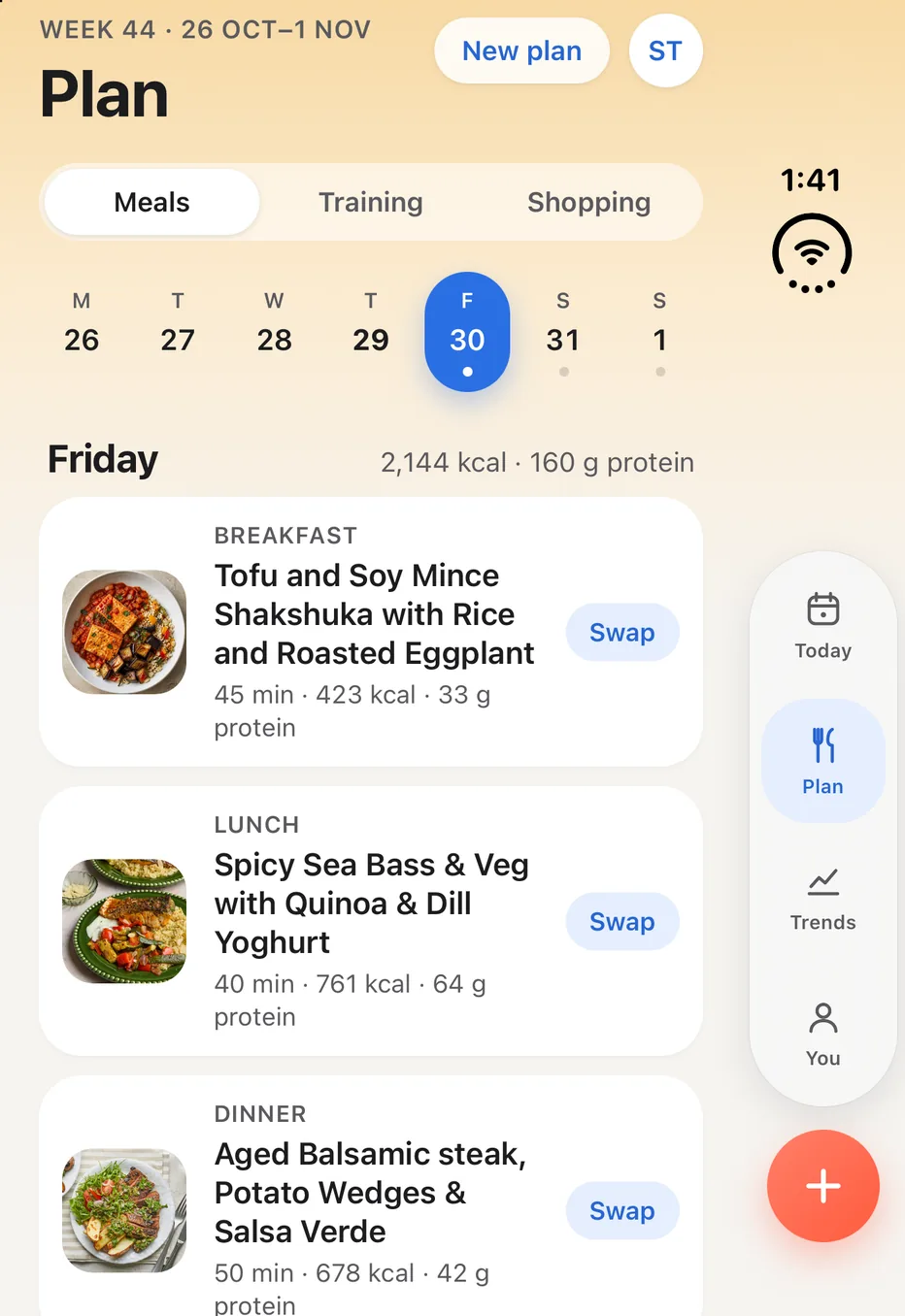
Plan, Meals, Friday of week 44 on a folded iPhone Duo: 2,144 kcal and 160 g protein across a tofu and soy mince shakshuka, 423 kcal; spicy sea bass with quinoa, 761 kcal; and aged balsamic steak, 678 kcal, each with a Swap button
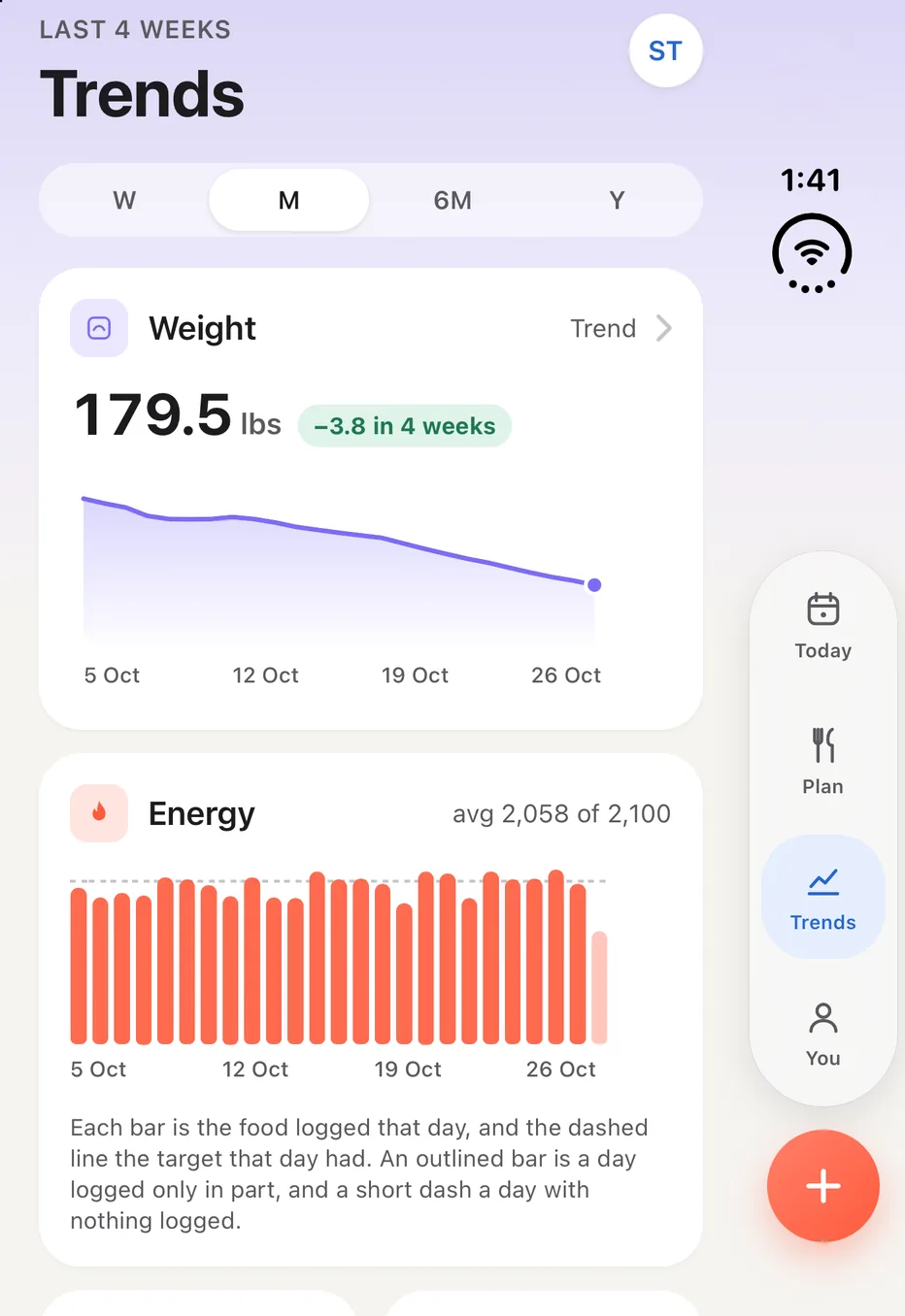
Trends over the last four weeks on a folded iPhone Duo: weight 179.5 lb, down 3.8 in four weeks, with its trend line, and energy averaging 2,058 kcal against a 2,100 target
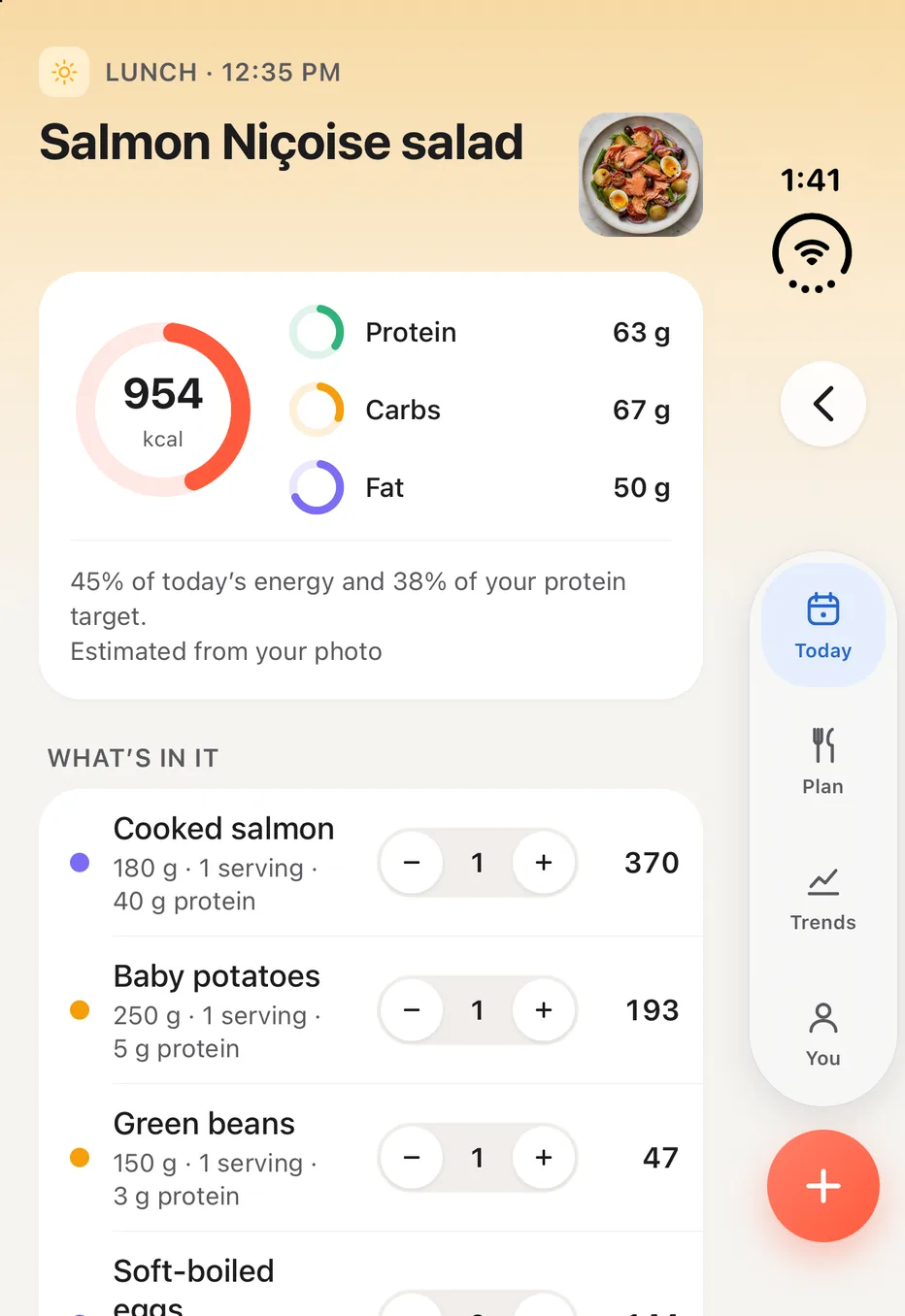
A logged salmon Niçoise lunch at 12:35 pm on a folded iPhone Duo, with Back in the column under the clock: 954 kcal with 63 g protein, 67 g carbs and 50 g fat, 45% of the day's energy and 38% of its protein target, and every item with its own portion stepper
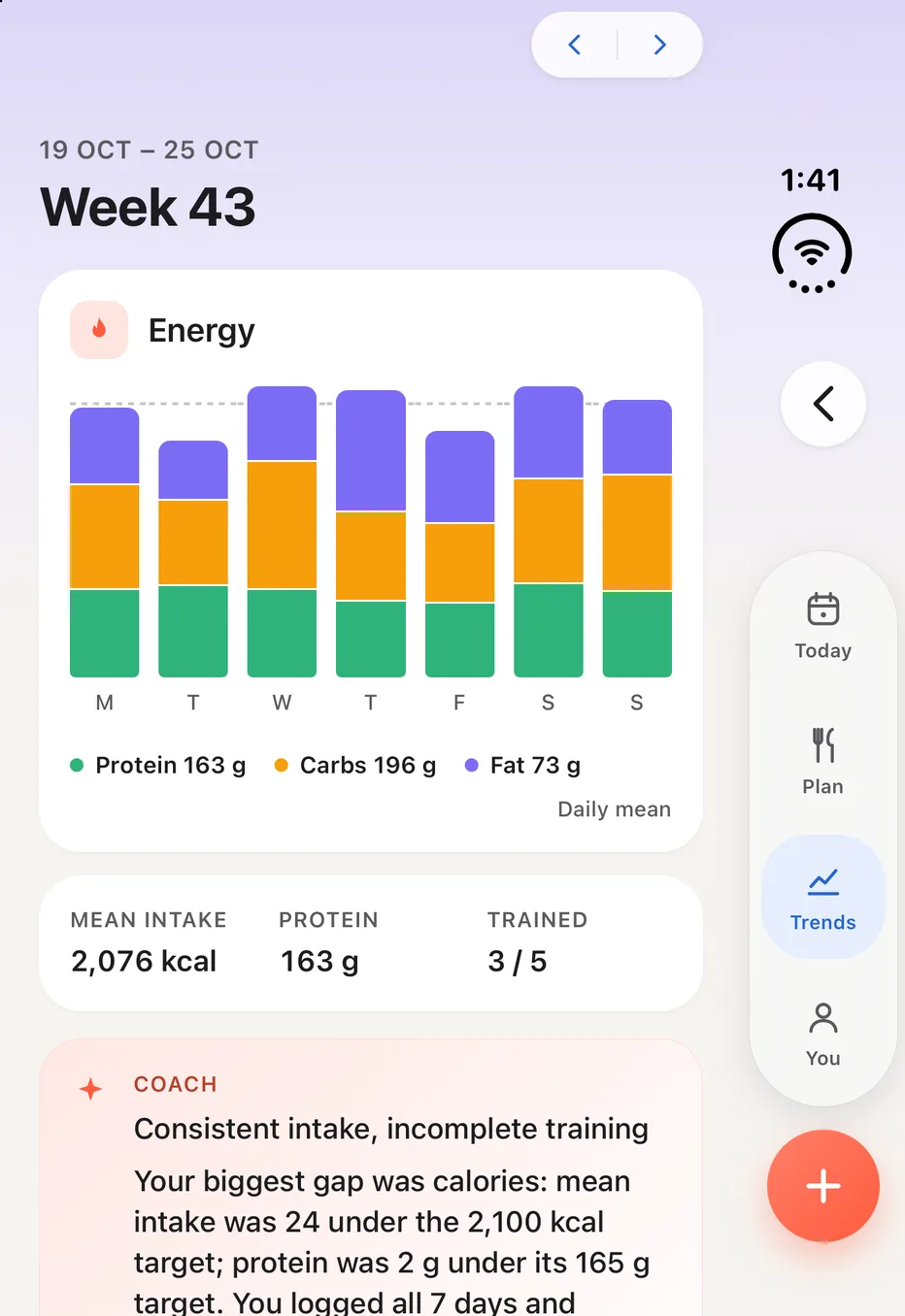
Week 43, 19 to 25 October, in review on a folded iPhone Duo: energy by macro for each day, a mean intake of 2,076 kcal, 163 g of protein, 3 of 5 sessions trained, and the coach's read, Consistent intake, incomplete training

35,895kcal, for one poke bowl

Where the numbers come from

Measured where it can be measured. Estimated only where it must be.

That was a real answer, once. The fix was not to scale a bad number, which invents data. Now any estimate above 1,000 kcal is refused and re-examined by a larger model, whether it came from a photo or a sentence, and every total is recomputed from its items.

Most of what you see in CoreFuel is arithmetic you can check. A model is used in ten places, where reading a plate or a photo, hearing a sentence, writing a menu or a training week, or summing up a week takes judgement, and nowhere else.

A formula you can check

Targets

Mifflin–St Jeor for resting energy, a stated activity multiplier, a goal offset, clamped to a sane range. Protein from bodyweight. The equation is named on screen, with the 1990 paper and the IOM reference intakes linked.

Readiness

Percentiles and z-scores against your own baseline, shrunk toward published priors, a weighted mean, threshold rules. Statistics, not a model.

Next week’s target

What you logged against how your weight trend moved over four weeks, at 7,700 kcal per kilogram: an estimate of what you burn, and how sure it is. Your goal’s step comes off it — 500 kcal a day to lose. Until there are two weeks of logging and four weigh-ins, two check-ins decide instead. Either way you accept it or keep your own.

Picking the meal plan

A solver chooses the week’s recipes from the catalogue to meet your calorie and protein targets, in under two seconds. A model only refines the menu afterwards. The shopping list is added up from the week.

Progression

A lift goes up only when every set hit the top of its reps last time — by a plate’s step snapped to the weights your equipment has, or a rep for a bodyweight lift. Otherwise it holds, and the session says why.

Lifts

Epley’s formula, load × (1 + reps ÷ 30), on your strongest set each session, from sets of up to twelve reps with a load. An estimate to compare sessions by, not a weight to try.

The suggested cut

From the estimate and your weight: fat mass, lean mass held, a pace of 0.5–0.75% of body weight a week, a deficit never above a quarter of what you burn or below 1,200 kcal a day, and protein at 1.8 g per kilogram.

Patterns

Two kinds of your own days compared — training days and rest days, say. Counted, not written by a model, and they show what went together, not why.

Where a model is used: ten places, no others

01Photo → nutritionVision model itemises the plate
02Typed words → nutritionThe same, from a sentence
03Voice → transcriptSpeech to text, then 02
04Leftovers → what is leftPer item
05The weekly coach readOnce a week, labelled
06The meal plan’s chef passAfter the week is picked
07A swap you ask forIn words; a picture if none
08The training weekFrom your goal and equipment
09Body photos → an estimateFraming checked, then read
10A scan report → its figuresInBody or DEXA printout

No percentages on a photo log. The review says where to look instead: “Portions are the usual suspect, so nudge any that feel off.”

You › Privacy and data

What leaves your phone, and what doesn’t.

Each permission names its limit on the screen that asks for it. This is the short version; the full summary is one page.

The recording is never kept.

Voice is transcribed, then the audio is discarded. Not on the phone, not on the server.

Photos are read on our server.

Plate and body photos are uploaded and sent to OpenAI to be read, which does not train on them. Nothing is analysed on the device, and we do not say otherwise.

Body photos ask first.

For members 18 and over, behind a consent screen. Withdraw in You → Privacy and data → Body photographs and every one is deleted.

Plans never carry your name.

Your meal plan, training week and weekly summary are written from your goals, preferences and figures. Your name and email are never sent.

Delete means delete.

Delete account is in the app, with no request form. It erases your meals, plans, workouts, check-ins, photos and the account itself.

Read with permission, written back once.

Health data is read only for the types you allow. The only thing CoreFuel writes back is the weight you typed at check-in.

Sign in with Apple, and nothing else.

No password to hold, no email login, no guest mode.

Your data, exportable.

Your profile and the most recent 1,000 records of each kind, plans and workouts included, as one file from inside the app.

CoreFuel Plus

Fourteen days free. Then one subscription, everything included.

Every new account starts with fourteen free days. It is CoreFuel’s own trial, so there is no card and nothing to enter. After that, CoreFuel Plus renews monthly, at the price shown in the App Store for your country.

There is no lite tier: one subscription, and everything is included — logging, the meal plan and its shopping list, training, body analysis, Trends and the weekly review.

Today

Full access. Nothing to enter, nothing charged.

Day 14

The trial ends. Subscribe in the app to keep going; the price is on the screen, in your currency. The app counts the days down for you.

Any month

Cancel in your Apple ID subscriptions at least 24 hours before renewal. You keep access to the end of the period.

Start fourteen days free

Asked before downloading.

More answers in Support
What does the free trial include?
Everything. All fourteen days are the full app — meal plans, training and body analysis included, nothing held back. It is CoreFuel’s own trial rather than an Apple introductory offer, so there is no card to enter and nothing is charged. The app counts the days down for you on the CoreFuel Plus card in You.
How accurate is a photo estimate?
Better on the food than on the portion, and the app says so rather than showing you a percentage: “Portions are the usual suspect, so nudge any that feel off.” Every item is listed separately and every portion is yours to change before it counts. Any estimate above 1,000 kcal is refused and re-examined by a larger model, whether it came from a photo or a sentence.
Is body analysis medical advice?
No. It is an estimate from photographs, shown with its error bar — about two to three points of body fat either way from three photos — and every result says so: “An estimate from photographs, not a diagnosis.” Scales, scans and a clinician measure more precisely. It is for members aged 18 and over, and only after you agree to it.
Does the meal plan work around allergies?
Yes. You say which allergies and intolerances you have, what you dislike and what you eat, and the week is planned without them. Each recipe still ends with a reminder to check the labels yourself, because a plan is not a guarantee about what is in a packet.
Does it learn from my corrections?
No. Nothing you correct is used to retrain the model. What a correction does do is land in your own history, so the next time you eat the same thing it is the first thing search offers you, with the portion you set.
Is my photo analysed on my phone?
No. Plate and body photos are uploaded and read on our server, and we do not claim otherwise. Before a body photo is sent, the phone checks its framing on the device, and at most suggests a retake.
Is there an Android version?
Not in this release. CoreFuel is an iPhone app, and signs in with Apple.
Does it work on iPhone Duo?
Yes. Folded, every control works, but a little of the screen sits under the system’s clock: the avatar, the end of the week strip and the edge of the tab bar. The next update moves them clear of it.
Can I log a day I missed?
Yes. Pick the day on the week strip at the top of Today and log into it exactly as you would log into today. Falling a day behind is how most people abandon a tracker, so nothing about a past day is harder.
How do I cancel?
In your Apple ID subscriptions, at least 24 hours before the renewal date. You keep access to the end of the period you have paid for. Deleting your CoreFuel account does not cancel the subscription — cancel that first.

Tonight’s plate is a good place to start.

Install CoreFuel, sign in with Apple, and let it fill your facts from Apple Health. Fourteen days free, nothing to enter.

Download on theApp Store
Coming soon toGoogle Play